
Terms and Conditions
Before you purchase, please search the library to make sure the templates you desire are included. Every single template available in the library is found via search. There is no magic hidden stash of templates that we don’t put in the library.
Curious about how to use the templates and their quality? Please sign up for a free subscription. This allows you to download thousands of templates for model years 2007 and earlier. We understand you might need something newer for a project and those are available when you purchase a subscription. The older templates give you the opportunity to make sure this is the right product for your needs.
Because we allow you to search the library and try the templates before purchasing, Vehicle Templates Unleashed does not accept returns and does not refund payments for any products purchased on our site.
Frequently Asked Questions
Yes. ComputerCut Pro offers many designs based on which you can create individual designs for your customers. If we don’t have what you’re looking for, you can import designs in various file formats.
Absolutely. We strive to create consistent patterns, but please understand that there are personal preferences and we cannot satisfy everyone. You can adjust your tint and paint protection patterns to your liking and save them for future use.
Yes. You can place as many patterns as you like on the cutting window, but we strongly recommend processing no more than one entire vehicle at a time to ensure you don’t have issues with the film. Better safe than sorry.
No, we do not sell templates individually. We only sell subscriptions. No, we will not make an exception to this just this one time. For information on all subscription options, please visit our purchasing page.
 Absolutely! We encourage everyone to try our vehicle templates before buying anything. It is as simple as signing up for a free subscription!
The free subscription allows you to download an unlimited number of templates from model years 2007 and earlier. Sorry, you can’t try one newer template that you need for a current project. Once you’ve tested a few older templates, then you can purchase and get the newer templates you might need. We have a video that shows how easy it is to get a free subscription.
No, Safari is not supported. We recommend using Chrome or Firefox.
The best way to answer this is to try out our templates so that you can determine if your needs are truly met. We have some customers who have had great success creating window tints and we have had others who felt their needs weren’t met.
We encourage you to sign up for a free subscription. Download a template (or a thousand) and test them out to see if they provide what you need for window tinting.
No. Suppose you have five cars to process and know which models they are. You simply open each car individually, minimize it to the desktop, and then you can process them all day long without an active internet connection.
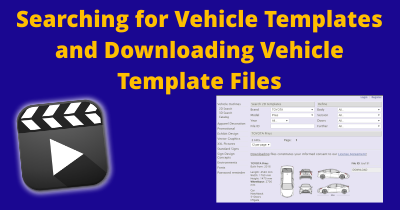 As much as we would like to have the entire library memorized, the only way for us to answer if a specific template is available is to search the library. The good news is that you can do the exact same search! Go to the Search/Download page to see if we have the template you desire. If you find it, we’ve got it. If you don’t find it, we simply don’t have it. There is no secret stash of templates that aren’t in the library.
If you are unsure how to search the library, please watch the Searching for Vehicle Templates and Downloading Vehicle Template Files video and it will show you the entire process.
The short answer is they don’t include measurements. All templates are designed at a 1:20 scale. If you are using design software with measurement capabilities, you can easily measure whatever part of the template you desire using your software.
Honestly, we can’t answer this question as everyone’s needs are unique to them. We encourage you to sign up for a free subscription. Download a template (or a thousand) and test them out to see if they fulfill your need.
Yes. ComputerCut Pro features one of the fastest nesting functions currently available on the market. With just a few clicks, patterns can be optimized to minimize film waste.
All our vehicles are drawn according to manufacturer specifications. Each vehicle drawing is carefully checked before being made available for download.
Curved windows, curves, and beads cannot be adequately represented in the two-dimensional drawings. Angled windows and surfaces are shown in a foreshortened perspective, and corner radii may vary. Before using the drawings for printing and cutting, the dimensions must be verified on the actual vehicle. No liability can be accepted for dimensional deviations.
None of the subscriptions auto-renew and therefore there is no need to cancel to avoid future charges. If you purchase a one-month subscription, it will expire after a month. If you purchase a one-year subscription, it will expire after a year. If you wanted to extend either subscription, you will have to purchase another month or year. Alternatively you can purchase a lifetime subscription and it will never expire.
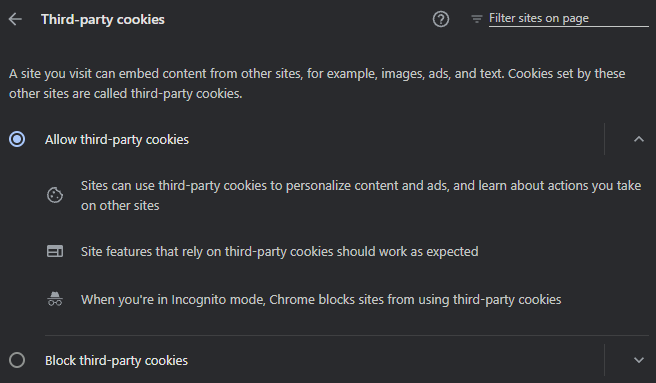
To manage third-party cookies in Google Chrome, click the three-dot menu, go to Settings > Privacy and security > Third-party cookies. You can choose to allow them, block them entirely, or block them only in Incognito mode, where they are disabled by default. Your settings should look like the screenshot below.
We have an entire page dedicated to frequently asked questions about downloading templates. Look over the page and you’ll likely find the answer you desire.
We also have a video, Searching for Vehicle Templates and Downloading Vehicle Template Files, that shows the entire process for searching for vehicle templates and then downloading them with both a free and a paid subscription.
If you’re still having trouble, let us know.
Double-click the file to unzip it. You can also use decompression software.
When you view the Clearshield product catalog or access the vehicle on the main ComputerCut Pro page, you will see an installation difficulty rating. This rating is on a scale of 1 to 5, where 1 stands for the easiest installation and 5 for the most difficult. Ratings are assigned based on the following criteria:
Scale 1: This rating represents the easiest of all possible installations. Beginners and first-time installers who have watched the Clearshield installation video can perform these installations with relative ease.
Scale 2: This rating indicates a slightly more complex installation than a rating 1, requiring additional maneuvers and manipulation of the pattern.
Scale 3: This rating indicates an intermediate difficulty installation. New and/or inexperienced installers will have some difficulty with this type of installation.
Scale 4: This rating indicates a difficult installation due to the complex curves of the vehicle. These installations are time-consuming and tedious for inexperienced installers.
Scale 5: This rating indicates an extremely difficult installation representing a vehicle with excessive compound curves. These installations should only be performed by installers with sufficient experience.
Vehicle templates are added as soon as they are created with quite a few added each month. Some of the templates added are for new model years and some are for popular older vehicles (including some covered by free subscription). You are always welcome to download any available template from the library during your subscription term. We encourage you to search the library to see if the specific template you desire is available. The most popular templates added are covered regularly in the Vehicle Templates Blog. Subscribe and you’ll get an email a few times a month with a list of added templates.
No. The software is paid once per year. This means no additional cancellation is necessary, allowing you to remain flexible.
AI, CDR, PDF and PSD format files are provided as a compressed ZIP file.
We have a detailed blog post on this, Ram Trucks Became a Standalone Brand in 2010. The short answer is that Ram became a standalone brand in 2010 and therefore all Ram trucks are found under the Ram brand.
